

Installation
- Install Component - Extensions » Install/Uninstall
- Download and Install searchplugin - Extensions » Install/Uninstall
- Enable Searchplugin - Extensions » Plug-ins
Read ...
- Tutorial - Probably very helpfull to start with
Usage
Two possible situations
- The table(s) are already in your joomla database or you use tools like phpmyadmin or myodbc to import the data » continue to setup database.
- You have a proper Excel-Table » The pro version has an "import"-function.
Set up your first Database
- Open Joodb - Select Components»JooDatabase in the admin menu to open database configuration.
- Create new DB- Click on "new"-button at the toolbar to open Wizzard-Popup.
- Step 1 - Enter a name and choose your main database-table.
- Step 2 - Select some important fields like the "Title", "Unique-ID" and "Main content text".
Every Database must have these fields defined- Step 3 - There is no step 3. Close the popup.
- Add Menuentry - Add a JooDB-Catalog-view to your menus.
- Thats it - You are ready! Test your database in frontend.
Customize Templates
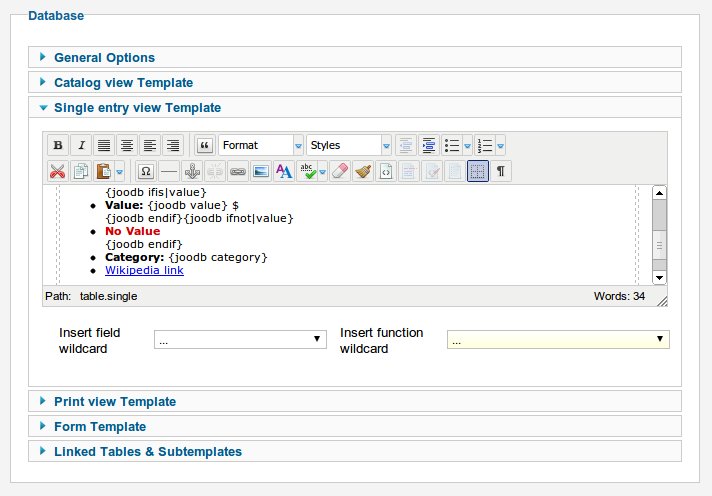
Edit the predefined templates by clicking on the database title. Like template-engines (for example Smarty) JooDatabase uses wildcards to replace informations in templates. That makes the output highly customizable. JooDatabsae uses only some simple wildcards.
- Data wildcards - {joodb field|FIELDNAME} or {} is replaced by the field content. You can limit the output to a maximum char length by adding |XXX to the fieldname. (For example {joodb field|longtext|120})
- Control wildcards- Control wildcards are replaced by page-control elements. Most of them are only valid in a certain context.
- {joodb pagenav} - Pagination links in catalog-view
- {joodb pagecount} - Pagination page informations in catalog-view
- {joodb resultcount} - Total datasets in in catalog-view
- {joodb nodata} - Error-message if no data was retrieved in catalog-view
- {joodb limitbox} - Form for changing the amount of entries per page in catalog-view
- {joodb readon} - A »Read more...« link to the single-view of the current entry
- {joodb searchbox|[FIELDLIST]} - Form with searchfield and buttons to search the database in catalog-view. Optional FIELDLIST is a comma separated list of fieldnames for a target search function.
- {joodb searchbutton} - A submit search buttton
- {joodb resetbutton} - A reset search buttton
- {joodb ifis|FIELDNAME} -Show the following output until {joodb endif} only if the field is NOT EMPTY
- {joodb ifnot|FIELDNAME} -Show the following output until {joodb endif} only if the field is EMPTY
- {joodb alphabox} - [A-Z] Link-form for selecting the entries by letters in catalog-view
- {joodb printbutton} - Print page button in single-entry view
- NEW IN VERSION 1.5
- {joodb form|FIELDNAME}- Inserts a formfield to the form-view. The formelement-types are dependent on the datafield-type. Form validation is done automatically. If a datafield can not be Null it is required.
- Varchar is displayed as a input-element
- Text is displayed as a textbox. Possible parameters are "password" and "email". (For example {joodb form|usermail|email})
- Enum and set fields are displayed as a select-element
- Enum and set fields with less then 3 elements are displayed as a radio-element (enum) or checkbox (set)
- {joodb captcha} - A captcha
- {joodb submitbutton} - A submit button
- {joodb path2image} - Filename and path to the image related with the entry in /images/joodb. (empty image if none)
- {joodb path2thumb} - Filename and path to the thumbnail image related with the entry. Example <img src="/{joodb path2thumb}" alt="*" width="100" />
- NEW IN VERSION 1.7
- {joodb orderlink|FIELDNAME|[LINKTEXT]} - Prints a sort-link which sorts the catalog result to the given FIELDNAME. If no LINKTEXT is provided only the URL and not the whole anchor is printed. With the class informations you are able to style your anchor.
- Loop wildcards - The catalog-view expects two {joodb loop} declarations in the template. The part between these wildcards defines one item-row.
Limitations
- JooDatabase free is only for simple data-collections and requirements. The pro version supports relational data structures.
- JooDatabase is for advanced users with basic knowledge about Joomla, MYSQL and Template-engines.